交互式的凸透镜成像应用
交互式的凸透镜成像应用。用户可以通过调整物距和焦距来观察成像的变化。
主要功能:
用户可以通过滑块调整物距(u)和焦距(f)。
根据凸透镜成像公式(1/f = 1/u + 1/v)计算像距(v)。
根据物距和焦距的关系,判断像的性质(大小、倒正、虚实)。
在屏幕上绘制凸透镜、物体、像以及光线图。
凸透镜成像规律:
当 u > 2f 时,成倒立、缩小的实像,像距 f < v < 2f。
当 u = 2f 时,成倒立、等大的实像,像距 v = 2f。
当 f < u < 2f 时,成倒立、放大的实像,像距 v > 2f。
当 u = f 时,不成像(平行光)。
当 u < f 时,成正立、放大的虚像,像与物同侧。
包括以下光线:
平行于主光轴的光线,经过凸透镜后通过焦点。
通过光心的光线,方向不变。
通过焦点的光线,经过凸透镜后平行于主光轴。
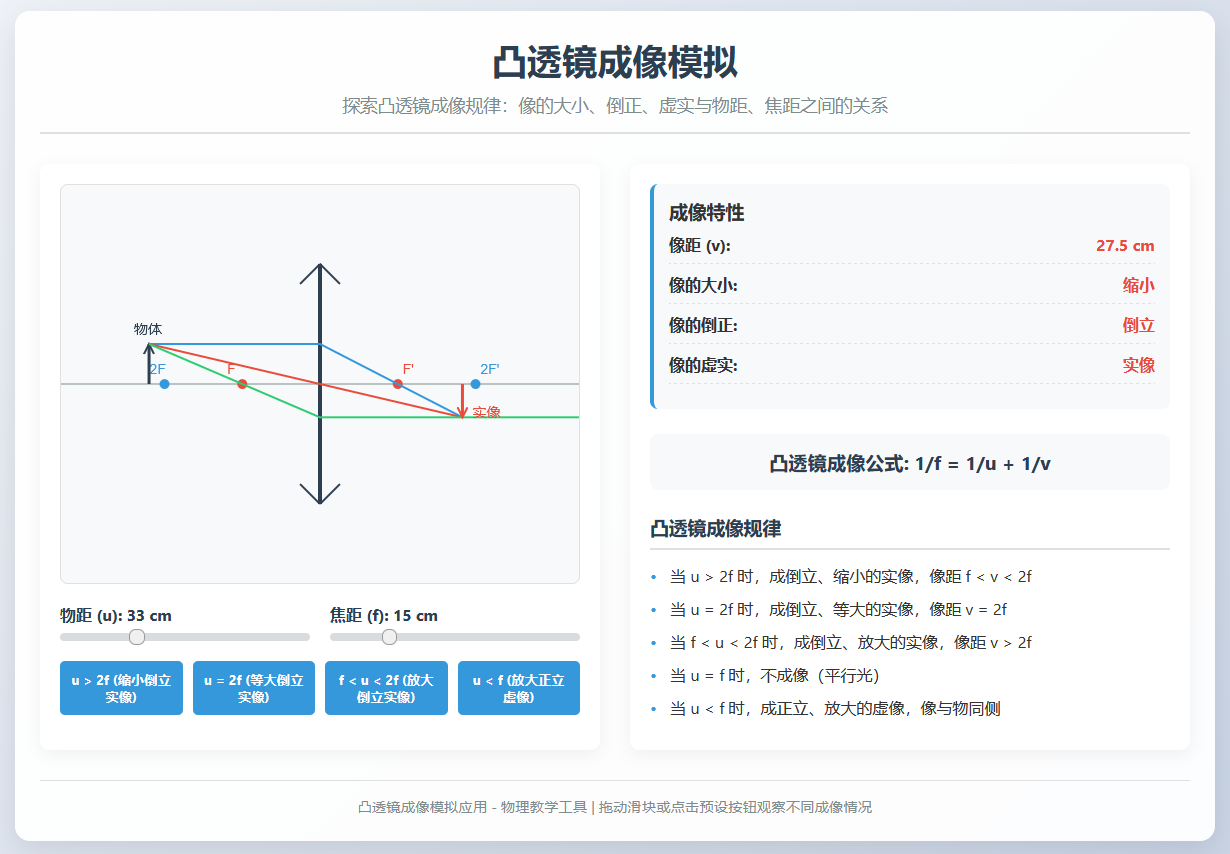
以下是实现代码( 由 deepseek 依据人工指令生成):
<!DOCTYPE html>
<html>
<head>
<meta charset="UTF-8">
<meta name="viewport" content="width=device-width, initial-scale=1.0">
<title>凸透镜成像模拟</title>
<style>
* {
margin: 0;
padding: 0;
box-sizing: border-box;
font-family: 'Segoe UI', Tahoma, Geneva, Verdana, sans-serif;
}
body {
background: linear-gradient(135deg, #f5f7fa 0%, #c3cfe2 100%);
min-height: 100vh;
padding: 20px;
color: #333;
}
.container {
max-width: 1200px;
margin: 0 auto;
background-color: rgba(255, 255, 255, 0.95);
border-radius: 15px;
box-shadow: 0 10px 30px rgba(0, 0, 0, 0.1);
padding: 25px;
overflow: hidden;
}
header {
text-align: center;
margin-bottom: 30px;
padding-bottom: 15px;
border-bottom: 2px solid #e0e0e0;
}
h1 {
color: #2c3e50;
margin-bottom: 10px;
font-size: 2.2rem;
}
.subtitle {
color: #7f8c8d;
font-size: 1.1rem;
}
.content {
display: flex;
flex-wrap: wrap;
gap: 30px;
}
.simulation-area {
flex: 1;
min-width: 500px;
background-color: #fff;
border-radius: 10px;
padding: 20px;
box-shadow: 0 5px 15px rgba(0, 0, 0, 0.05);
}
.canvas-container {
position: relative;
height: 400px;
background-color: #f8f9fa;
border-radius: 8px;
margin-bottom: 20px;
overflow: hidden;
border: 1px solid #e0e0e0;
}
#lensCanvas {
width: 100%;
height: 100%;
display: block;
}
.controls {
display: flex;
flex-wrap: wrap;
gap: 20px;
margin-bottom: 20px;
}
.control-group {
flex: 1;
min-width: 200px;
}
.control-group label {
display: block;
margin-bottom: 8px;
font-weight: bold;
color: #2c3e50;
}
.slider-container {
display: flex;
align-items: center;
gap: 10px;
}
.slider-container input {
flex: 1;
}
.slider-container span {
min-width: 50px;
text-align: right;
font-weight: bold;
}
input[type="range"] {
-webkit-appearance: none;
width: 100%;
height: 8px;
border-radius: 4px;
background: #d7dcdf;
outline: none;
}
input[type="range"]::-webkit-slider-thumb {
-webkit-appearance: none;
width: 20px;
height: 20px;
border-radius: 50%;
background: #3498db;
cursor: pointer;
transition: background 0.3s;
}
input[type="range"]::-webkit-slider-thumb:hover {
background: #2980b9;
}
.preset-buttons {
display: flex;
flex-wrap: wrap;
gap: 10px;
margin-top: 15px;
}
.preset-btn {
flex: 1;
min-width: 120px;
padding: 10px;
background-color: #3498db;
color: white;
border: none;
border-radius: 5px;
cursor: pointer;
transition: background-color 0.3s;
font-weight: bold;
}
.preset-btn:hover {
background-color: #2980b9;
}
.info-area {
flex: 1;
min-width: 300px;
background-color: #fff;
border-radius: 10px;
padding: 20px;
box-shadow: 0 5px 15px rgba(0, 0, 0, 0.05);
}
.image-properties {
margin-bottom: 25px;
padding: 15px;
background-color: #f8f9fa;
border-radius: 8px;
border-left: 4px solid #3498db;
}
.property {
margin: 10px 0;
display: flex;
justify-content: space-between;
padding-bottom: 8px;
border-bottom: 1px dashed #e0e0e0;
}
.property-name {
font-weight: bold;
}
.property-value {
font-weight: bold;
color: #e74c3c;
}
.rules {
margin-top: 25px;
}
.rules h3 {
margin-bottom: 15px;
color: #2c3e50;
border-bottom: 2px solid #e0e0e0;
padding-bottom: 8px;
}
.rule-item {
margin: 12px 0;
padding-left: 20px;
position: relative;
}
.rule-item:before {
content: "•";
position: absolute;
left: 0;
color: #3498db;
font-weight: bold;
}
.formula {
text-align: center;
margin: 20px 0;
padding: 15px;
background-color: #f8f9fa;
border-radius: 8px;
font-size: 1.2rem;
font-weight: bold;
color: #2c3e50;
}
footer {
text-align: center;
margin-top: 30px;
padding-top: 15px;
border-top: 1px solid #e0e0e0;
color: #7f8c8d;
font-size: 0.9rem;
}
@media (max-width: 768px) {
.content {
flex-direction: column;
}
.simulation-area, .info-area {
min-width: 100%;
}
}
</style>
</head>
<body>
<div>
<header>
<h1>凸透镜成像模拟</h1>
<p>探索凸透镜成像规律:像的大小、倒正、虚实与物距、焦距之间的关系</p>
</header>
<div>
<div>
<div>
<canvas id="lensCanvas"></canvas>
</div>
<div>
<div>
<label for="objectDistance">物距 (u): <span id="objectDistanceValue">30</span> cm</label>
<div>
<input type="range" id="objectDistance" min="5" max="100" value="30" step="1">
</div>
</div>
<div>
<label for="focalLength">焦距 (f): <span id="focalLengthValue">15</span> cm</label>
<div>
<input type="range" id="focalLength" min="5" max="50" value="15" step="1">
</div>
</div>
</div>
<div>
<button data-u="60" data-f="15">u > 2f (缩小倒立实像)</button>
<button data-u="30" data-f="15">u = 2f (等大倒立实像)</button>
<button data-u="20" data-f="15">f < u < 2f (放大倒立实像)</button>
<button data-u="10" data-f="15">u < f (放大正立虚像)</button>
</div>
</div>
<div>
<div>
<h3>成像特性</h3>
<div>
<span>像距 (v):</span>
<span id="imageDistance">30 cm</span>
</div>
<div>
<span>像的大小:</span>
<span id="imageSize">等大</span>
</div>
<div>
<span>像的倒正:</span>
<span id="imageOrientation">倒立</span>
</div>
<div>
<span>像的虚实:</span>
<span id="imageType">实像</span>
</div>
</div>
<div>
凸透镜成像公式: 1/f = 1/u + 1/v
</div>
<div>
<h3>凸透镜成像规律</h3>
<div>当 u > 2f 时,成倒立、缩小的实像,像距 f < v < 2f</div>
<div>当 u = 2f 时,成倒立、等大的实像,像距 v = 2f</div>
<div>当 f < u < 2f 时,成倒立、放大的实像,像距 v > 2f</div>
<div>当 u = f 时,不成像(平行光)</div>
<div>当 u < f 时,成正立、放大的虚像,像与物同侧</div>
</div>
</div>
</div>
<footer>
<p>凸透镜成像模拟应用 - 物理教学工具 | 拖动滑块或点击预设按钮观察不同成像情况</p>
</footer>
</div>
<script>
// 获取DOM元素
const canvas = document.getElementById('lensCanvas');
const ctx = canvas.getContext('2d');
const objectDistanceSlider = document.getElementById('objectDistance');
const focalLengthSlider = document.getElementById('focalLength');
const objectDistanceValue = document.getElementById('objectDistanceValue');
const focalLengthValue = document.getElementById('focalLengthValue');
const imageDistanceElement = document.getElementById('imageDistance');
const imageSizeElement = document.getElementById('imageSize');
const imageOrientationElement = document.getElementById('imageOrientation');
const imageTypeElement = document.getElementById('imageType');
const presetButtons = document.querySelectorAll('.preset-btn');
// 设置画布尺寸
function setCanvasSize() {
const container = canvas.parentElement;
canvas.width = container.clientWidth;
canvas.height = container.clientHeight;
}
// 初始化变量
let objectDistance = parseInt(objectDistanceSlider.value);
let focalLength = parseInt(focalLengthSlider.value);
let imageDistance = calculateImageDistance(objectDistance, focalLength);
// 设置初始滑块显示值
objectDistanceValue.textContent = objectDistance;
focalLengthValue.textContent = focalLength;
// 计算像距
function calculateImageDistance(u, f) {
if (u === f) {
return Infinity; // 不成像
}
return (u * f) / (u - f);
}
// 绘制凸透镜成像图
function drawLensDiagram() {
const width = canvas.width;
const height = canvas.height;
const centerY = height / 2;
const lensX = width / 2;
// 清除画布
ctx.clearRect(0, 0, width, height);
// 绘制主光轴
ctx.beginPath();
ctx.moveTo(0, centerY);
ctx.lineTo(width, centerY);
ctx.strokeStyle = '#7f8c8d';
ctx.lineWidth = 1;
ctx.stroke();
// 绘制凸透镜
ctx.beginPath();
ctx.moveTo(lensX, centerY - 120);
ctx.lineTo(lensX, centerY + 120);
ctx.strokeStyle = '#2c3e50';
ctx.lineWidth = 4;
ctx.stroke();
// 绘制透镜符号
ctx.beginPath();
ctx.moveTo(lensX, centerY - 120);
ctx.lineTo(lensX - 20, centerY - 100);
ctx.moveTo(lensX, centerY - 120);
ctx.lineTo(lensX + 20, centerY - 100);
ctx.moveTo(lensX, centerY + 120);
ctx.lineTo(lensX - 20, centerY + 100);
ctx.moveTo(lensX, centerY + 120);
ctx.lineTo(lensX + 20, centerY + 100);
ctx.strokeStyle = '#2c3e50';
ctx.lineWidth = 2;
ctx.stroke();
// 绘制焦点
const scale = width / 100; // 将cm转换为像素
const focusDistance = focalLength * scale;
// 左侧焦点F
ctx.beginPath();
ctx.arc(lensX - focusDistance, centerY, 5, 0, Math.PI * 2);
ctx.fillStyle = '#e74c3c';
ctx.fill();
ctx.fillStyle = '#e74c3c';
ctx.font = '14px Arial';
ctx.fillText('F', lensX - focusDistance - 15, centerY - 10);
// 右侧焦点F'
ctx.beginPath();
ctx.arc(lensX + focusDistance, centerY, 5, 0, Math.PI * 2);
ctx.fillStyle = '#e74c3c';
ctx.fill();
ctx.fillText("F'", lensX + focusDistance + 5, centerY - 10);
// 绘制2F点
ctx.beginPath();
ctx.arc(lensX - 2 * focusDistance, centerY, 5, 0, Math.PI * 2);
ctx.fillStyle = '#3498db';
ctx.fill();
ctx.fillStyle = '#3498db';
ctx.fillText('2F', lensX - 2 * focusDistance - 15, centerY - 10);
ctx.beginPath();
ctx.arc(lensX + 2 * focusDistance, centerY, 5, 0, Math.PI * 2);
ctx.fillStyle = '#3498db';
ctx.fill();
ctx.fillText("2F'", lensX + 2 * focusDistance + 5, centerY - 10);
// 绘制物体
const objectX = lensX - objectDistance * scale;
const objectHeight = 40; // 物体高度
ctx.beginPath();
ctx.moveTo(objectX, centerY);
ctx.lineTo(objectX, centerY - objectHeight);
ctx.strokeStyle = '#2c3e50';
ctx.lineWidth = 3;
ctx.stroke();
// 绘制物体箭头
ctx.beginPath();
ctx.moveTo(objectX - 5, centerY - objectHeight + 10);
ctx.lineTo(objectX, centerY - objectHeight);
ctx.lineTo(objectX + 5, centerY - objectHeight + 10);
ctx.strokeStyle = '#2c3e50';
ctx.lineWidth = 2;
ctx.stroke();
ctx.fillStyle = '#2c3e50';
ctx.font = '14px Arial';
ctx.fillText('物体', objectX - 15, centerY - objectHeight - 10);
// 绘制光线和像
if (objectDistance !== focalLength) { // 不成像情况
const imageX = lensX + imageDistance * scale;
const magnification = Math.abs(imageDistance / objectDistance);
const imageHeight = objectHeight * magnification;
// 判断是实像还是虚像
const isRealImage = objectDistance > focalLength;
// 绘制三条主要光线
// 光线1: 平行于主光轴,经过透镜后通过焦点
ctx.beginPath();
ctx.moveTo(objectX, centerY - objectHeight);
ctx.lineTo(lensX, centerY - objectHeight);
ctx.strokeStyle = '#3498db';
ctx.lineWidth = 2;
ctx.stroke();
ctx.beginPath();
if (isRealImage) {
ctx.moveTo(lensX, centerY - objectHeight);
ctx.lineTo(lensX + focusDistance, centerY);
ctx.lineTo(imageX, centerY - (objectHeight > 0 ? -imageHeight : imageHeight));
} else {
// 虚像的光线反向延长
ctx.setLineDash([5, 5]);
ctx.moveTo(lensX, centerY - objectHeight);
ctx.lineTo(lensX + focusDistance, centerY);
ctx.lineTo(imageX, centerY - (objectHeight > 0 ? -imageHeight : imageHeight));
ctx.stroke();
ctx.setLineDash([]);
}
ctx.stroke();
// 光线2: 通过光心,方向不变
ctx.beginPath();
ctx.moveTo(objectX, centerY - objectHeight);
ctx.lineTo(imageX, centerY - (objectHeight > 0 ? -imageHeight : imageHeight));
ctx.strokeStyle = '#e74c3c';
ctx.lineWidth = 2;
ctx.stroke();
// 光线3: 通过焦点,经过透镜后平行于主光轴
// 修正:从物体顶端通过左侧焦点,射向透镜,折射后平行于主光轴
const leftFocusX = lensX - focusDistance;
if (isRealImage) {
// 计算光线3在透镜上的入射点
// 从物体顶端到左侧焦点的直线方程
const slope = (centerY - (centerY - objectHeight)) / (leftFocusX - objectX);
const intercept = (centerY - objectHeight) - slope * objectX;
const incidentY = slope * lensX + intercept;
// 绘制光线3
ctx.beginPath();
// 从物体顶端到透镜(经过左侧焦点)
ctx.moveTo(objectX, centerY - objectHeight);
ctx.lineTo(lensX, incidentY);
// 从透镜折射后平行于主光轴
ctx.lineTo(width, incidentY);
ctx.strokeStyle = '#2ecc71';
ctx.lineWidth = 2;
ctx.stroke();
} else {
// 虚像情况
// 计算光线3在透镜上的入射点
const slope = (centerY - (centerY - objectHeight)) / (leftFocusX - objectX);
const intercept = (centerY - objectHeight) - slope * objectX;
const incidentY = slope * lensX + intercept;
// 绘制光线3
ctx.beginPath();
// 从物体顶端到透镜(经过左侧焦点)
ctx.moveTo(objectX, centerY - objectHeight);
ctx.lineTo(lensX, incidentY);
// 从透镜折射后平行于主光轴(实际光线部分)
ctx.lineTo(width, incidentY);
ctx.strokeStyle = '#2ecc71';
ctx.lineWidth = 2;
ctx.stroke();
// 绘制反向延长线(虚线)
ctx.setLineDash([5, 5]);
ctx.beginPath();
// 从像的顶端到透镜
ctx.moveTo(imageX, centerY - (objectHeight > 0 ? -imageHeight : imageHeight));
ctx.lineTo(lensX, incidentY);
ctx.strokeStyle = '#2ecc71';
ctx.lineWidth = 2;
ctx.stroke();
ctx.setLineDash([]);
}
// 绘制像
ctx.beginPath();
ctx.moveTo(imageX, centerY);
if (isRealImage) {
ctx.lineTo(imageX, centerY - (objectHeight > 0 ? -imageHeight : imageHeight));
ctx.strokeStyle = '#e74c3c';
ctx.lineWidth = 3;
ctx.stroke();
// 绘制像箭头
ctx.beginPath();
ctx.moveTo(imageX - 5, centerY - (objectHeight > 0 ? -imageHeight + 10 : imageHeight - 10));
ctx.lineTo(imageX, centerY - (objectHeight > 0 ? -imageHeight : imageHeight));
ctx.lineTo(imageX + 5, centerY - (objectHeight > 0 ? -imageHeight + 10 : imageHeight - 10));
ctx.strokeStyle = '#e74c3c';
ctx.lineWidth = 2;
ctx.stroke();
ctx.fillStyle = '#e74c3c';
ctx.fillText('实像', imageX + 10, centerY - (objectHeight > 0 ? -imageHeight : imageHeight));
} else {
// 虚像用虚线表示
ctx.setLineDash([5, 5]);
ctx.lineTo(imageX, centerY - (objectHeight > 0 ? -imageHeight : imageHeight));
ctx.strokeStyle = '#e74c3c';
ctx.lineWidth = 3;
ctx.stroke();
ctx.setLineDash([]);
// 绘制虚像箭头
ctx.setLineDash([5, 5]);
ctx.beginPath();
ctx.moveTo(imageX - 5, centerY - (objectHeight > 0 ? -imageHeight + 10 : imageHeight - 10));
ctx.lineTo(imageX, centerY - (objectHeight > 0 ? -imageHeight : imageHeight));
ctx.lineTo(imageX + 5, centerY - (objectHeight > 0 ? -imageHeight + 10 : imageHeight - 10));
ctx.strokeStyle = '#e74c3c';
ctx.lineWidth = 2;
ctx.stroke();
ctx.setLineDash([]);
ctx.fillStyle = '#e74c3c';
ctx.fillText('虚像', imageX + 10, centerY - (objectHeight > 0 ? -imageHeight : imageHeight));
}
} else {
// 不成像情况 - 平行光
ctx.fillStyle = '#e74c3c';
ctx.font = '16px Arial';
ctx.fillText('不成像 (平行光)', lensX - 50, centerY - 50);
// 绘制平行光线
ctx.beginPath();
ctx.moveTo(objectX, centerY - objectHeight);
ctx.lineTo(lensX, centerY - objectHeight);
ctx.strokeStyle = '#3498db';
ctx.lineWidth = 2;
ctx.stroke();
ctx.beginPath();
ctx.moveTo(lensX, centerY - objectHeight);
ctx.lineTo(width, centerY - objectHeight);
ctx.strokeStyle = '#3498db';
ctx.lineWidth = 2;
ctx.stroke();
}
}
// 更新成像特性显示
function updateImageProperties() {
// 计算像距
imageDistance = calculateImageDistance(objectDistance, focalLength);
// 更新像距显示
if (imageDistance === Infinity) {
imageDistanceElement.textContent = "∞ (不成像)";
} else {
imageDistanceElement.textContent = Math.abs(imageDistance).toFixed(1) + " cm";
}
// 更新像的大小
if (objectDistance === focalLength) {
imageSizeElement.textContent = "不成像";
} else {
const magnification = Math.abs(imageDistance / objectDistance);
if (magnification > 1) {
imageSizeElement.textContent = "放大";
} else if (magnification < 1) {
imageSizeElement.textContent = "缩小";
} else {
imageSizeElement.textContent = "等大";
}
}
// 更新像的倒正
if (objectDistance === focalLength) {
imageOrientationElement.textContent = "不成像";
} else if (objectDistance < focalLength) {
imageOrientationElement.textContent = "正立";
} else {
imageOrientationElement.textContent = "倒立";
}
// 更新像的虚实
if (objectDistance === focalLength) {
imageTypeElement.textContent = "不成像";
} else if (objectDistance > focalLength) {
imageTypeElement.textContent = "实像";
} else {
imageTypeElement.textContent = "虚像";
}
}
// 初始化
function init() {
setCanvasSize();
updateImageProperties();
drawLensDiagram();
// 添加窗口大小改变事件监听
window.addEventListener('resize', function() {
setCanvasSize();
drawLensDiagram();
});
// 添加滑块事件监听
objectDistanceSlider.addEventListener('input', function() {
objectDistance = parseInt(this.value);
objectDistanceValue.textContent = objectDistance;
updateImageProperties();
drawLensDiagram();
});
focalLengthSlider.addEventListener('input', function() {
focalLength = parseInt(this.value);
focalLengthValue.textContent = focalLength;
updateImageProperties();
drawLensDiagram();
});
// 添加预设按钮事件监听
presetButtons.forEach(button => {
button.addEventListener('click', function() {
const u = parseInt(this.getAttribute('data-u'));
const f = parseInt(this.getAttribute('data-f'));
objectDistance = u;
focalLength = f;
objectDistanceSlider.value = u;
focalLengthSlider.value = f;
objectDistanceValue.textContent = u;
focalLengthValue.textContent = f;
updateImageProperties();
drawLensDiagram();
});
});
}
// 启动应用
init();
</script>
</body>
</html>
目录 返回
首页