一元二次方程教学应用代码
一个交互式的一元二次方程教学应用。
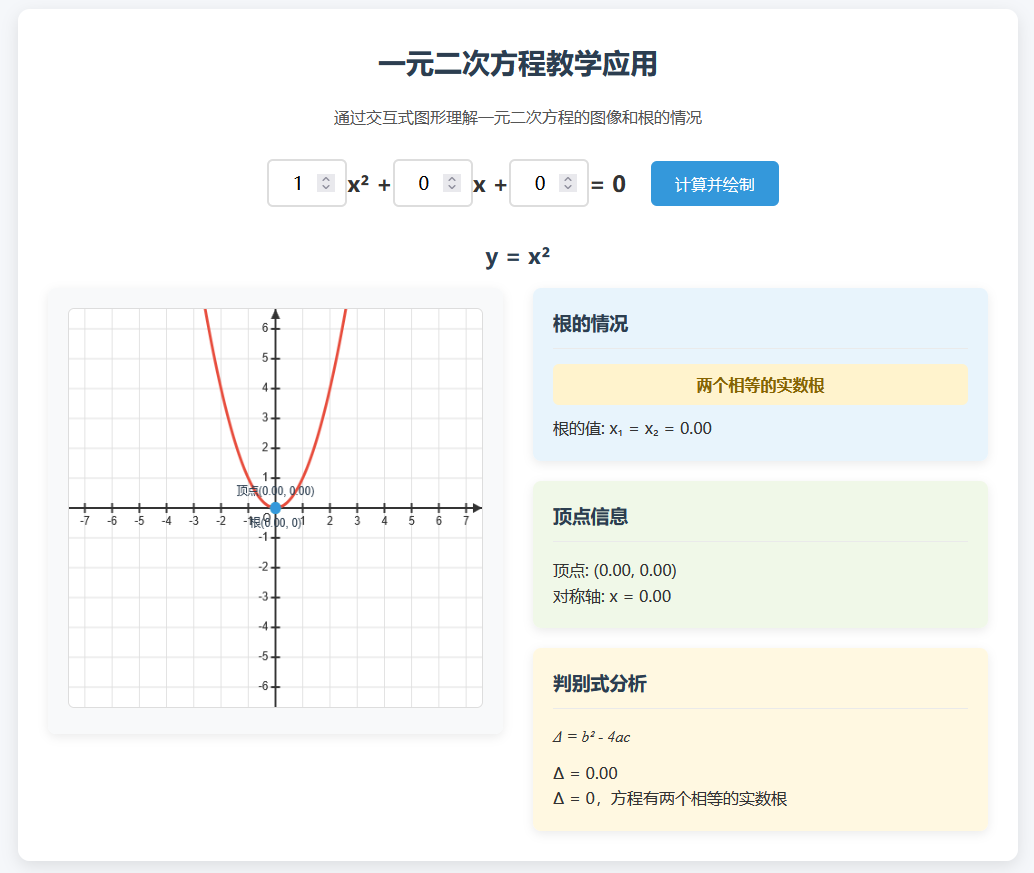
这个一元二次方程教学应用具有以下功能:
交互式输入:可以输入a、b、c三个系数来定义一元二次方程
实时图形显示:根据输入的系数实时绘制抛物线图像
根的情况分析:
显示判别式Δ的值
根据Δ的值判断根的情况(两个不等实根、两个相等实根、无实根)
显示根的具体值
顶点信息:显示抛物线的顶点坐标和对称轴方程
可视化标记:在图像上标记顶点和根的位置
以下是实现代码( 由 deepseek 依据人工指令生成):
<!DOCTYPE html>
<html>
<head>
<meta charset="UTF-8">
<meta name="viewport" content="width=device-width, initial-scale=1.0">
<title>一元二次方程教学应用</title>
<style>
* {
box-sizing: border-box;
margin: 0;
padding: 0;
font-family: 'Microsoft YaHei', Arial, sans-serif;
}
body {
background-color: #f5f7fa;
color: #333;
line-height: 1.6;
padding: 20px;
}
.container {
max-width: 1000px;
margin: 0 auto;
background-color: white;
border-radius: 12px;
box-shadow: 0 5px 15px rgba(0, 0, 0, 0.1);
padding: 30px;
}
h1 {
text-align: center;
color: #2c3e50;
margin-bottom: 20px;
font-size: 28px;
}
.description {
text-align: center;
margin-bottom: 30px;
color: #555;
}
.input-section {
display: flex;
justify-content: center;
align-items: center;
margin-bottom: 30px;
flex-wrap: wrap;
gap: 15px;
}
.equation-input {
display: flex;
align-items: center;
font-size: 22px;
font-weight: bold;
margin: 0 10px;
}
input[type="number"] {
width: 80px;
padding: 10px;
font-size: 18px;
border: 2px solid #ddd;
border-radius: 6px;
text-align: center;
transition: border-color 0.3s;
}
input[type="number"]:focus {
border-color: #3498db;
outline: none;
}
button {
background-color: #3498db;
color: white;
border: none;
padding: 12px 24px;
font-size: 16px;
border-radius: 6px;
cursor: pointer;
transition: background-color 0.3s;
}
button:hover {
background-color: #2980b9;
}
.content {
display: flex;
flex-wrap: wrap;
gap: 30px;
}
.graph-section, .info-section {
flex: 1;
min-width: 300px;
}
.graph-container {
background-color: #f8f9fa;
border-radius: 8px;
padding: 20px;
box-shadow: 0 3px 10px rgba(0, 0, 0, 0.08);
}
#graphCanvas {
width: 100%;
height: 400px;
background-color: white;
border: 1px solid #ddd;
border-radius: 6px;
}
.info-section {
display: flex;
flex-direction: column;
gap: 20px;
}
.info-card {
background-color: #f8f9fa;
border-radius: 8px;
padding: 20px;
box-shadow: 0 3px 10px rgba(0, 0, 0, 0.08);
}
.info-card h3 {
color: #2c3e50;
margin-bottom: 15px;
padding-bottom: 10px;
border-bottom: 1px solid #eaeaea;
}
.roots-info {
background-color: #e8f4fc;
}
.vertex-info {
background-color: #f0f8e8;
}
.discriminant-info {
background-color: #fff8e1;
}
.equation-display {
font-size: 22px;
font-weight: bold;
text-align: center;
margin: 15px 0;
color: #2c3e50;
}
.root-type {
font-weight: bold;
margin: 10px 0;
padding: 8px 15px;
border-radius: 6px;
text-align: center;
}
.two-real-roots {
background-color: #d4edda;
color: #155724;
}
.one-real-root {
background-color: #fff3cd;
color: #856404;
}
.no-real-roots {
background-color: #f8d7da;
color: #721c24;
}
.formula {
font-family: 'Times New Roman', serif;
font-style: italic;
margin: 10px 0;
}
@media (max-width: 768px) {
.content {
flex-direction: column;
}
.input-section {
flex-direction: column;
align-items: stretch;
}
.equation-input {
justify-content: center;
}
}
</style>
</head>
<body>
<div>
<h1>一元二次方程教学应用</h1>
<p>通过交互式图形理解一元二次方程的图像和根的情况</p>
<div>
<div>
<input type="number" id="a" value="1" step="0.1">
<span>x² + </span>
<input type="number" id="b" value="0" step="0.1">
<span>x + </span>
<input type="number" id="c" value="0" step="0.1">
<span> = 0</span>
</div>
<button id="calculateBtn">计算并绘制</button>
</div>
<div id="equationDisplay">y = x²</div>
<div>
<div>
<div>
<canvas id="graphCanvas"></canvas>
</div>
</div>
<div>
<div class="info-card roots-info">
<h3>根的情况</h3>
<div id="rootType" class="root-type two-real-roots">两个不相等的实数根</div>
<div id="rootsValue">根的值: x₁ = 0, x₂ = 0</div>
</div>
<div class="info-card vertex-info">
<h3>顶点信息</h3>
<div id="vertexValue">顶点: (0, 0)</div>
<div id="axisValue">对称轴: x = 0</div>
</div>
<div class="info-card discriminant-info">
<h3>判别式分析</h3>
<div>Δ = b² - 4ac</div>
<div id="discriminantValue">Δ = 0</div>
<div id="discriminantAnalysis">Δ = 0,方程有两个相等的实数根</div>
</div>
</div>
</div>
</div>
<script>
document.addEventListener('DOMContentLoaded', function() {
const canvas = document.getElementById('graphCanvas');
const ctx = canvas.getContext('2d');
const aInput = document.getElementById('a');
const bInput = document.getElementById('b');
const cInput = document.getElementById('c');
const calculateBtn = document.getElementById('calculateBtn');
const equationDisplay = document.getElementById('equationDisplay');
const rootType = document.getElementById('rootType');
const rootsValue = document.getElementById('rootsValue');
const vertexValue = document.getElementById('vertexValue');
const axisValue = document.getElementById('axisValue');
const discriminantValue = document.getElementById('discriminantValue');
const discriminantAnalysis = document.getElementById('discriminantAnalysis');
// 设置Canvas尺寸
function resizeCanvas() {
const container = canvas.parentElement;
canvas.width = container.clientWidth;
canvas.height = 400;
drawGraph();
}
// 绘制坐标轴和网格
function drawAxes() {
const width = canvas.width;
const height = canvas.height;
const centerX = width / 2;
const centerY = height / 2;
const scale = 30; // 每个单位对应的像素数
// 清除画布
ctx.clearRect(0, 0, width, height);
// 绘制网格
ctx.strokeStyle = '#e0e0e0';
ctx.lineWidth = 1;
// 垂直线
for (let x = centerX % scale; x < width; x += scale) {
ctx.beginPath();
ctx.moveTo(x, 0);
ctx.lineTo(x, height);
ctx.stroke();
}
// 水平线
for (let y = centerY % scale; y < height; y += scale) {
ctx.beginPath();
ctx.moveTo(0, y);
ctx.lineTo(width, y);
ctx.stroke();
}
// 绘制坐标轴
ctx.strokeStyle = '#333';
ctx.lineWidth = 2;
// X轴
ctx.beginPath();
ctx.moveTo(0, centerY);
ctx.lineTo(width, centerY);
ctx.stroke();
// Y轴
ctx.beginPath();
ctx.moveTo(centerX, 0);
ctx.lineTo(centerX, height);
ctx.stroke();
// 绘制箭头
ctx.fillStyle = '#333';
// X轴箭头
ctx.beginPath();
ctx.moveTo(width - 10, centerY - 5);
ctx.lineTo(width, centerY);
ctx.lineTo(width - 10, centerY + 5);
ctx.fill();
// Y轴箭头
ctx.beginPath();
ctx.moveTo(centerX - 5, 10);
ctx.lineTo(centerX, 0);
ctx.lineTo(centerX + 5, 10);
ctx.fill();
// 绘制刻度标记
ctx.fillStyle = '#333';
ctx.font = '12px Arial';
ctx.textAlign = 'center';
ctx.textBaseline = 'top';
// X轴刻度
for (let i = -Math.floor(width / scale / 2); i <= Math.floor(width / scale / 2); i++) {
if (i !== 0) {
const x = centerX + i * scale;
ctx.beginPath();
ctx.moveTo(x, centerY - 5);
ctx.lineTo(x, centerY + 5);
ctx.stroke();
ctx.fillText(i.toString(), x, centerY + 8);
}
}
// Y轴刻度
ctx.textAlign = 'right';
ctx.textBaseline = 'middle';
for (let i = -Math.floor(height / scale / 2); i <= Math.floor(height / scale / 2); i++) {
if (i !== 0) {
const y = centerY - i * scale;
ctx.beginPath();
ctx.moveTo(centerX - 5, y);
ctx.lineTo(centerX + 5, y);
ctx.stroke();
ctx.fillText(i.toString(), centerX - 8, y);
}
}
// 标记原点
ctx.textAlign = 'right';
ctx.textBaseline = 'top';
ctx.fillText('O', centerX - 5, centerY + 5);
return { centerX, centerY, scale };
}
// 绘制函数图像
function drawFunction(a, b, c, centerX, centerY, scale) {
ctx.strokeStyle = '#e74c3c';
ctx.lineWidth = 3;
ctx.beginPath();
const width = canvas.width;
let isFirstPoint = true;
for (let pixelX = 0; pixelX <= width; pixelX++) {
const x = (pixelX - centerX) / scale;
const y = a * x * x + b * x + c;
const pixelY = centerY - y * scale;
if (isFirstPoint) {
ctx.moveTo(pixelX, pixelY);
isFirstPoint = false;
} else {
ctx.lineTo(pixelX, pixelY);
}
}
ctx.stroke();
}
// 标记根和顶点
function markPoints(a, b, c, centerX, centerY, scale) {
// 计算判别式
const discriminant = b * b - 4 * a * c;
// 标记顶点
const vertexX = -b / (2 * a);
const vertexY = a * vertexX * vertexX + b * vertexX + c;
const vertexPixelX = centerX + vertexX * scale;
const vertexPixelY = centerY - vertexY * scale;
ctx.fillStyle = '#2ecc71';
ctx.beginPath();
ctx.arc(vertexPixelX, vertexPixelY, 6, 0, Math.PI * 2);
ctx.fill();
ctx.fillStyle = '#2c3e50';
ctx.font = '12px Arial';
ctx.textAlign = 'center';
ctx.textBaseline = 'bottom';
ctx.fillText(`顶点(${vertexX.toFixed(2)}, ${vertexY.toFixed(2)})`, vertexPixelX, vertexPixelY - 10);
// 标记根(如果存在实数根)
if (discriminant >= 0) {
const root1 = (-b - Math.sqrt(discriminant)) / (2 * a);
const root2 = (-b + Math.sqrt(discriminant)) / (2 * a);
const root1PixelX = centerX + root1 * scale;
const root1PixelY = centerY;
const root2PixelX = centerX + root2 * scale;
const root2PixelY = centerY;
ctx.fillStyle = '#3498db';
ctx.beginPath();
ctx.arc(root1PixelX, root1PixelY, 6, 0, Math.PI * 2);
ctx.fill();
ctx.beginPath();
ctx.arc(root2PixelX, root2PixelY, 6, 0, Math.PI * 2);
ctx.fill();
ctx.fillStyle = '#2c3e50';
ctx.textAlign = 'center';
ctx.textBaseline = 'top';
if (discriminant === 0) {
ctx.fillText(`根(${root1.toFixed(2)}, 0)`, root1PixelX, root1PixelY + 10);
} else {
ctx.fillText(`x₁(${root1.toFixed(2)}, 0)`, root1PixelX, root1PixelY + 10);
ctx.fillText(`x₂(${root2.toFixed(2)}, 0)`, root2PixelX, root2PixelY + 10);
}
}
}
// 绘制图形
function drawGraph() {
const a = parseFloat(aInput.value);
const b = parseFloat(bInput.value);
const c = parseFloat(cInput.value);
// 更新方程显示
let equationText = 'y = ';
if (a !== 0) {
if (a === 1) equationText += 'x²';
else if (a === -1) equationText += '-x²';
else equationText += a + 'x²';
}
if (b !== 0) {
if (b > 0 && a !== 0) equationText += ' + ';
if (b === 1) equationText += 'x';
else if (b === -1) equationText += '-x';
else equationText += b + 'x';
}
if (c !== 0) {
if (c > 0 && (a !== 0 || b !== 0)) equationText += ' + ';
equationText += c;
}
if (a === 0 && b === 0 && c === 0) {
equationText = 'y = 0';
}
equationDisplay.textContent = equationText;
// 绘制坐标轴
const { centerX, centerY, scale } = drawAxes();
// 绘制函数图像
drawFunction(a, b, c, centerX, centerY, scale);
// 标记特殊点
markPoints(a, b, c, centerX, centerY, scale);
// 更新信息
updateInfo(a, b, c);
}
// 更新信息显示
function updateInfo(a, b, c) {
// 计算判别式
const discriminant = b * b - 4 * a * c;
// 更新判别式信息
discriminantValue.textContent = `Δ = ${discriminant.toFixed(2)}`;
// 计算顶点
const vertexX = -b / (2 * a);
const vertexY = a * vertexX * vertexX + b * vertexX + c;
vertexValue.textContent = `顶点: (${vertexX.toFixed(2)}, ${vertexY.toFixed(2)})`;
axisValue.textContent = `对称轴: x = ${vertexX.toFixed(2)}`;
// 更新根的信息
if (discriminant > 0) {
rootType.textContent = '两个不相等的实数根';
rootType.className = 'root-type two-real-roots';
const root1 = (-b - Math.sqrt(discriminant)) / (2 * a);
const root2 = (-b + Math.sqrt(discriminant)) / (2 * a);
rootsValue.textContent = `根的值: x₁ = ${root1.toFixed(2)}, x₂ = ${root2.toFixed(2)}`;
discriminantAnalysis.textContent = `Δ > 0,方程有两个不相等的实数根`;
} else if (discriminant === 0) {
rootType.textContent = '两个相等的实数根';
rootType.className = 'root-type one-real-root';
const root = -b / (2 * a);
rootsValue.textContent = `根的值: x₁ = x₂ = ${root.toFixed(2)}`;
discriminantAnalysis.textContent = `Δ = 0,方程有两个相等的实数根`;
} else {
rootType.textContent = '没有实数根';
rootType.className = 'root-type no-real-roots';
const realPart = -b / (2 * a);
const imaginaryPart = Math.sqrt(-discriminant) / (2 * a);
if (imaginaryPart === 1) {
rootsValue.textContent = `根的值: x₁ = ${realPart.toFixed(2)} + i, x₂ = ${realPart.toFixed(2)} - i`;
} else {
rootsValue.textContent = `根的值: x₁ = ${realPart.toFixed(2)} + ${imaginaryPart.toFixed(2)}i, x₂ = ${realPart.toFixed(2)} - ${imaginaryPart.toFixed(2)}i`;
}
discriminantAnalysis.textContent = `Δ < 0,方程没有实数根,有两个共轭复数根`;
}
}
// 初始绘制
resizeCanvas();
// 事件监听
calculateBtn.addEventListener('click', drawGraph);
window.addEventListener('resize', resizeCanvas);
// 输入变化时自动更新
aInput.addEventListener('input', drawGraph);
bInput.addEventListener('input', drawGraph);
cInput.addEventListener('input', drawGraph);
});
</script>
</body>
</html> 
目录 返回
首页