凸透镜成像小应用
功能说明:
用户可调节 物距(u) 和 焦距(f)
实时显示:
成像公式计算结果(像距 v)
像的性质:实像/虚像、放大/缩小/等大、正立/倒立
动态光路图(简化版,用 Canvas 绘制)
支持常见成像情况(u > 2f, u = 2f, f < u < 2f, u = f, u < f)
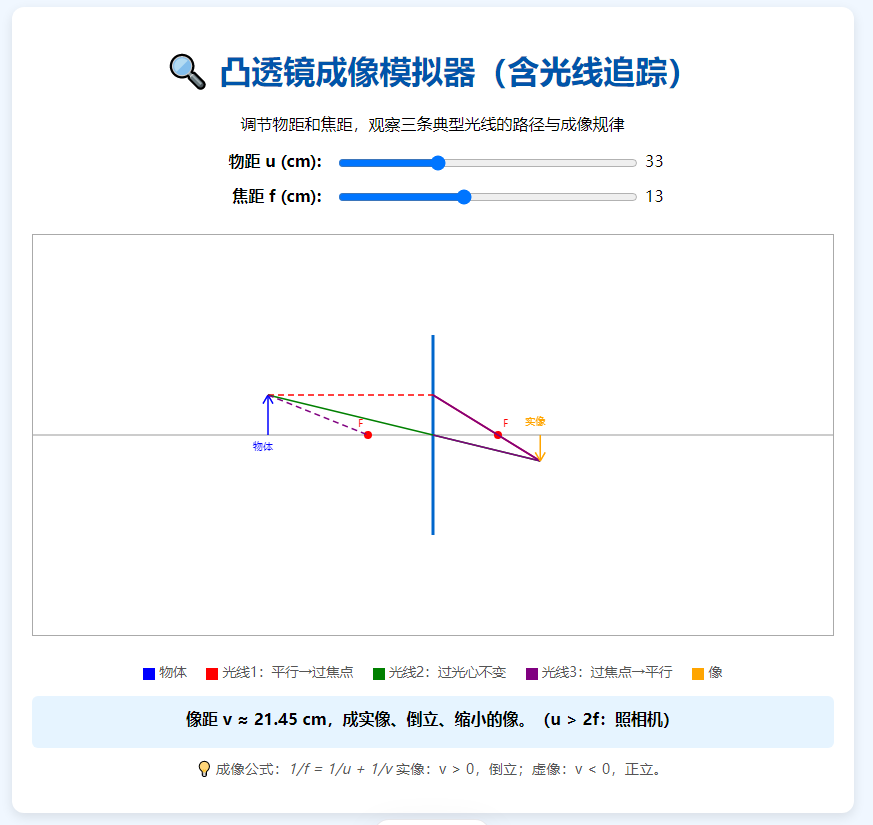
<!DOCTYPE html>
<html>
<head>
  <meta charset="UTF-8" />
  <title>凸透镜成像模拟器</title>
  <style>
    body {
      font-family: "Microsoft YaHei", sans-serif;
      text-align: center;
      background-color: #f0f8ff;
      padding: 20px;
    }
    h1 {
      color: #0066cc;
    }
    .container {
      max-width: 800px;
      margin: 0 auto;
      background: white;
      padding: 20px;
      border-radius: 10px;
      box-shadow: 0 0 10px rgba(0,0,0,0.1);
    }
    canvas {
      border: 1px solid #ccc;
      margin: 15px 0;
      background-color: #fff;
    }
    .controls {
      margin: 15px 0;
    }
    label {
      display: inline-block;
      width: 120px;
      text-align: right;
      margin-right: 10px;
    }
    input[type="range"] {
      width: 300px;
    }
    .result {
      margin-top: 15px;
      padding: 10px;
      background-color: #e6f2ff;
      border-radius: 5px;
      font-weight: bold;
    }
  </style>
</head>
<body>
  <div>
    <h1>🔍 凸透镜成像模拟器</h1>
    <p>调节物距和焦距,观察成像规律</p>

    <div>
      <label for="uSlider">物距 u (cm):</label>
      <input type="range" id="uSlider" min="1" max="100" value="30" />
      <span id="uValue">30</span>
    </div>

    <div>
      <label for="fSlider">焦距 f (cm):</label>
      <input type="range" id="fSlider" min="1" max="30" value="10" />
      <span id="fValue">10</span>
    </div>

    <canvas id="lensCanvas" width="600" height="300"></canvas>

    <div id="resultBox">
      正在计算成像结果...
    </div>

    <p style="font-size: 0.9em; color: #666;">
      💡 提示:<br>
      实像:可在光屏上呈现,倒立;虚像:不能呈现在光屏上,正立。<br>
      成像公式:1/f = 1/u + 1/v
    </p>
  </div>

  <script>
    const canvas = document.getElementById('lensCanvas');
    const ctx = canvas.getContext('2d');
    const uSlider = document.getElementById('uSlider');
    const fSlider = document.getElementById('fSlider');
    const uValue = document.getElementById('uValue');
    const fValue = document.getElementById('fValue');
    const resultBox = document.getElementById('resultBox');

    // 初始值
    let u = parseFloat(uSlider.value);
    let f = parseFloat(fSlider.value);

    // 更新显示
    function update() {
      u = parseFloat(uSlider.value);
      f = parseFloat(fSlider.value);
      uValue.textContent = u;
      fValue.textContent = f;

      drawLens();
      calculateImage();
    }

    // 绘制简化的光路图
    function drawLens() {
      ctx.clearRect(0, 0, canvas.width, canvas.height);

      const centerX = canvas.width / 2;
      const centerY = canvas.height / 2;
      const scale = 5; // 1cm = 5px

      // 画主光轴
      ctx.beginPath();
      ctx.moveTo(0, centerY);
      ctx.lineTo(canvas.width, centerY);
      ctx.strokeStyle = '#999';
      ctx.stroke();

      // 画透镜(竖线)
      ctx.beginPath();
      ctx.moveTo(centerX, centerY - 80);
      ctx.lineTo(centerX, centerY + 80);
      ctx.strokeStyle = '#0066cc';
      ctx.lineWidth = 3;
      ctx.stroke();
      ctx.lineWidth = 1;

      // 画焦点 F(左右各一个)
      const fPx = f * scale;
      ctx.beginPath();
      ctx.arc(centerX - fPx, centerY, 3, 0, Math.PI * 2);
      ctx.arc(centerX + fPx, centerY, 3, 0, Math.PI * 2);
      ctx.fillStyle = 'red';
      ctx.fill();
      ctx.fillText('F', centerX - fPx - 10, centerY - 5);
      ctx.fillText('F', centerX + fPx + 5, centerY - 5);

      // 画物体(箭头,在左侧)
      const uPx = u * scale;
      const objX = centerX - uPx;
      if (objX > 0) {
        drawArrow(ctx, objX, centerY, objX, centerY - 40, 'blue');
        ctx.fillText('物体', objX - 15, centerY + 15);
      }

      // 计算像距 v
      let v;
      if (u === f) {
        // 平行光,不成像
        resultBox.innerHTML = '物体位于焦点,光线平行,<b>不成像</b>。';
        return;
      } else {
        v = 1 / (1/f - 1/u); // 透镜公式:1/f = 1/u + 1/v → v = 1/(1/f - 1/u)
      }

      // 画像(根据 v 的正负判断位置)
      if (v > 0) {
        // 实像,在右侧
        const imgX = centerX + v * scale;
        const imgHeight = (v / u) * 40; // 放大率 = |v/u|
        drawArrow(ctx, imgX, centerY, imgX, centerY + imgHeight, 'green');
        ctx.fillText('实像', imgX - 15, centerY - 10);
      } else if (v < 0) {
        // 虚像,在左侧(同侧)
        const imgX = centerX + v * scale; // v 为负,所以 imgX < centerX
        const imgHeight = Math.abs(v / u) * 40;
        drawArrow(ctx, imgX, centerY, imgX, centerY - imgHeight, 'purple', true);
        ctx.fillText('虚像', imgX - 15, centerY + 15);
      }
    }

    // 画箭头函数
    function drawArrow(context, fromX, fromY, toX, toY, color, dashed = false) {
      context.beginPath();
      if (dashed) {
        context.setLineDash([5, 5]);
      } else {
        context.setLineDash([]);
      }
      context.moveTo(fromX, fromY);
      context.lineTo(toX, toY);
      context.strokeStyle = color;
      context.stroke();

      // 箭头头
      const angle = Math.atan2(toY - fromY, toX - fromX);
      const headLen = 10;
      context.beginPath();
      context.moveTo(toX, toY);
      context.lineTo(
        toX - headLen * Math.cos(angle - Math.PI / 6),
        toY - headLen * Math.sin(angle - Math.PI / 6)
      );
      context.moveTo(toX, toY);
      context.lineTo(
        toX - headLen * Math.cos(angle + Math.PI / 6),
        toY - headLen * Math.sin(angle + Math.PI / 6)
      );
      context.strokeStyle = color;
      context.stroke();
      context.setLineDash([]);
    }

    // 计算并显示成像性质
    function calculateImage() {
      if (u === f) {
        resultBox.innerHTML = '物体位于焦点,光线平行,<b>不成像</b>。';
        return;
      }

      const v = 1 / (1/f - 1/u);
      const magnification = Math.abs(v / u);

      let type, size, orientation;

      if (v > 0) {
        type = '实像';
        orientation = '倒立';
      } else {
        type = '虚像';
        orientation = '正立';
      }

      if (magnification > 1) {
        size = '放大';
      } else if (magnification < 1) {
        size = '缩小';
      } else {
        size = '等大';
      }

      let summary = `像距 v ≈ ${v.toFixed(2)} cm,成<b>${type}</b>、<b>${orientation}</b>、<b>${size}</b>的像。`;

      // 补充典型情况说明
      if (u > 2 * f) {
        summary += '(u > 2f:照相机原理)';
      } else if (u === 2 * f) {
        summary += '(u = 2f:等大实像)';
      } else if (u > f && u < 2 * f) {
        summary += '(f < u < 2f:投影仪原理)';
      } else if (u < f) {
        summary += '(u < f:放大镜原理)';
      }

      resultBox.innerHTML = summary;
    }

    // 绑定事件
    uSlider.addEventListener('input', update);
    fSlider.addEventListener('input', update);

    // 初始化
    update();
  </script>
</body>
</html>
目录 返回
首页