单摆实验模拟 探索简谐运动与物理原理
由于单摆的运动方程是非线性的,但对于小角度( ≤5° ) 可以使用近似简谐运动,大角度则需要数值解法。(文末有下载,可下载独立使用,在线使用 或 嵌入wps演示文稿使用)
单摆的运动方程:d²θ/dt² = - (g/L) * sin(θ)
单摆实验模拟应用具有以下特点:
交互式模拟:实时显示单摆运动;摆球运动轨迹可视化;平滑的动画效果
参数调节:摆长:0.5m 到 3.0m;初始角度:5° 到 80°;重力加速度:5m/s² 到 15m/s²;摆球质量 :0.1到0.5
实时数据显示:单摆周期;最大速度;当前位置;当前速度;运动轨迹和方向
控制功能:开始/暂停/重置按钮;参数调节时实时更新
物理原理说明:单摆运动方程;能量转换原理;实际应用场景
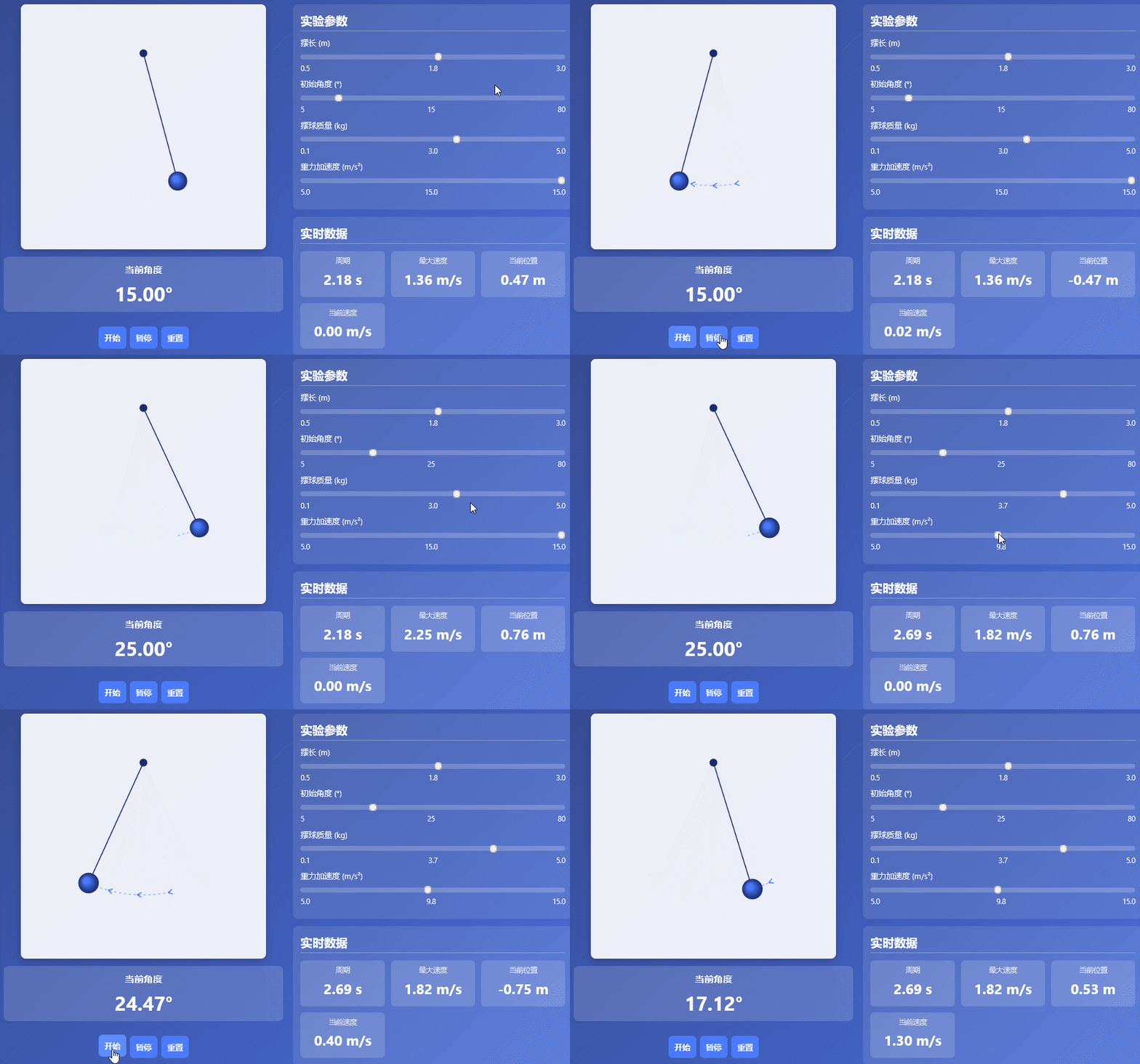
html源码(以下代码由 deepseek 根据人工指令生成)
<!DOCTYPE html>
<html>
<head>
<meta charset="UTF-8">
<meta name="viewport" content="width=device-width, initial-scale=1.0">
<title>单摆实验模拟</title>
<style>
* {
margin: 0;
padding: 0;
box-sizing: border-box;
font-family: 'Segoe UI', Tahoma, Geneva, Verdana, sans-serif;
}
body {
background: linear-gradient(135deg, #1a2a6c, #2a4cb3, #4a7bff);
color: white;
min-height: 100vh;
padding: 15px;
}
.container {
max-width: 1200px;
margin: 0 auto;
}
header {
text-align: center;
padding: 15px 0;
margin-bottom: 20px;
}
h1 {
font-size: clamp(1.8rem, 5vw, 2.5rem);
margin-bottom: 8px;
text-shadow: 2px 2px 4px rgba(0, 0, 0, 0.3);
}
.subtitle {
font-size: clamp(1rem, 3vw, 1.2rem);
opacity: 0.9;
}
.content {
display: flex;
flex-wrap: wrap;
gap: 20px;
background: rgba(255, 255, 255, 0.1);
backdrop-filter: blur(10px);
border-radius: 15px;
padding: 20px;
box-shadow: 0 10px 30px rgba(0, 0, 0, 0.2);
}
.simulation-area {
flex: 1;
min-width: 280px;
display: flex;
flex-direction: column;
align-items: center;
}
.canvas-container {
width: 100%;
max-width: 500px;
margin: 0 auto;
position: relative;
}
#pendulumCanvas {
width: 100%;
height: auto;
background: rgba(255, 255, 255, 0.9);
border-radius: 10px;
box-shadow: 0 5px 15px rgba(0, 0, 0, 0.2);
margin-bottom: 15px;
display: block;
}
.angle-display {
background: rgba(255, 255, 255, 0.15);
padding: 12px 20px;
border-radius: 10px;
margin-bottom: 15px;
text-align: center;
width: 100%;
}
.angle-display h3 {
margin-bottom: 8px;
color: white;
font-size: clamp(1rem, 3vw, 1.2rem);
}
.angle-value {
font-size: clamp(1.8rem, 6vw, 2.5rem);
font-weight: bold;
color: white;
}
.controls {
flex: 1;
min-width: 280px;
}
.control-group {
background: rgba(255, 255, 255, 0.1);
border-radius: 10px;
padding: 15px;
margin-bottom: 15px;
}
h2 {
font-size: clamp(1.2rem, 4vw, 1.5rem);
margin-bottom: 12px;
border-bottom: 2px solid rgba(255, 255, 255, 0.3);
padding-bottom: 6px;
}
.slider-container {
margin-bottom: 12px;
}
label {
display: block;
margin-bottom: 6px;
font-weight: 500;
font-size: clamp(0.9rem, 2.5vw, 1rem);
}
input[type="range"] {
width: 100%;
height: 10px;
border-radius: 5px;
background: rgba(255, 255, 255, 0.2);
outline: none;
-webkit-appearance: none;
}
input[type="range"]::-webkit-slider-thumb {
-webkit-appearance: none;
width: 22px;
height: 22px;
border-radius: 50%;
background: #4a7bff;
cursor: pointer;
}
.value-display {
display: flex;
justify-content: space-between;
margin-top: 5px;
font-size: clamp(0.8rem, 2.5vw, 0.9rem);
}
.data-display {
display: grid;
grid-template-columns: repeat(auto-fit, minmax(130px, 1fr));
gap: 12px;
margin-top: 15px;
}
.data-item {
background: rgba(255, 255, 255, 0.15);
padding: 12px;
border-radius: 8px;
text-align: center;
}
.data-value {
font-size: clamp(1.4rem, 4vw, 1.8rem);
font-weight: bold;
margin: 8px 0;
color: white;
}
.data-label {
font-size: clamp(0.8rem, 2.5vw, 0.9rem);
opacity: 0.8;
}
.buttons {
display: flex;
gap: 8px;
margin-top: 15px;
}
button {
flex: 1;
padding: 12px;
border: none;
border-radius: 8px;
background: #4a7bff;
color: white;
font-weight: bold;
cursor: pointer;
transition: all 0.3s ease;
font-size: clamp(0.9rem, 2.5vw, 1rem);
min-height: 44px;
}
button:hover {
background: #5d8cff;
transform: translateY(-2px);
}
button:active {
transform: translateY(0);
}
.theory {
margin-top: 25px;
background: rgba(255, 255, 255, 0.1);
border-radius: 15px;
padding: 20px;
}
.theory-content {
display: grid;
grid-template-columns: repeat(auto-fit, minmax(280px, 1fr));
gap: 15px;
margin-top: 15px;
}
.theory-card {
background: rgba(255, 255, 255, 0.1);
padding: 15px;
border-radius: 10px;
}
.theory-card h3 {
margin-bottom: 12px;
color: white;
font-size: clamp(1rem, 3vw, 1.2rem);
}
footer {
text-align: center;
margin-top: 30px;
padding: 15px;
opacity: 0.8;
font-size: clamp(0.8rem, 2.5vw, 0.9rem);
}
.conclusion {
background: rgba(255, 255, 255, 0.15);
padding: 12px;
border-radius: 10px;
margin-top: 15px;
border-left: 4px solid #4a7bff;
}
/* 移动端特定样式 */
@media (max-width: 768px) {
body {
padding: 10px;
}
.content {
flex-direction: column;
padding: 15px;
gap: 15px;
}
.simulation-area, .controls {
width: 100%;
}
.canvas-container {
max-width: 100%;
}
.buttons {
flex-wrap: wrap;
}
button {
min-width: 120px;
}
}
/* 小屏幕手机特定样式 */
@media (max-width: 480px) {
.content {
padding: 12px;
}
.control-group {
padding: 12px;
}
.data-display {
grid-template-columns: 1fr 1fr;
}
.theory-content {
grid-template-columns: 1fr;
}
}
</style>
</head>
<body>
<div>
<header>
<h1>单摆实验模拟</h1>
<p>探索简谐运动与物理原理</p>
</header>
<div>
<div>
<div>
<canvas id="pendulumCanvas" width="500" height="500"></canvas>
</div>
<div>
<h3>当前角度</h3>
<div id="currentAngle">0.00°</div>
</div>
<div>
<button id="startBtn">开始</button>
<button id="pauseBtn">暂停</button>
<button id="resetBtn">重置</button>
</div>
</div>
<div>
<div>
<h2>实验参数</h2>
<div>
<label for="lengthSlider">摆长 (m)</label>
<input type="range" id="lengthSlider" min="0.5" max="3.0" step="0.1" value="2.0">
<div>
<span>0.5</span>
<span id="lengthValue">2.0</span>
<span>3.0</span>
</div>
</div>
<div>
<label for="angleSlider">初始角度 (°)</label>
<input type="range" id="angleSlider" min="5" max="80" step="5" value="30">
<div>
<span>5</span>
<span id="angleValue">30</span>
<span>80</span>
</div>
</div>
<div>
<label for="massSlider">摆球质量 (kg)</label>
<input type="range" id="massSlider" min="0.1" max="5.0" step="0.1" value="1.0">
<div>
<span>0.1</span>
<span id="massValue">1.0</span>
<span>5.0</span>
</div>
</div>
<div>
<label for="gravitySlider">重力加速度 (m/s²)</label>
<input type="range" id="gravitySlider" min="5" max="15" step="0.1" value="9.8">
<div>
<span>5.0</span>
<span id="gravityValue">9.8</span>
<span>15.0</span>
</div>
</div>
</div>
<div>
<h2>实时数据</h2>
<div>
<div>
<div>周期</div>
<div id="periodValue">2.84 s</div>
</div>
<div>
<div>最大速度</div>
<div id="maxSpeedValue">2.38 m/s</div>
</div>
<div>
<div>当前位置</div>
<div id="positionValue">0.00 m</div>
</div>
<div>
<div>当前速度</div>
<div id="speedValue">0.00 m/s</div>
</div>
</div>
</div>
<div>
<h3>实验观察</h3>
<p>通过调节摆球质量,观察周期是否发生变化。可以发现:<strong>单摆的周期与摆球质量无关</strong>,只与摆长和重力加速度有关。</p>
</div>
</div>
</div>
<div>
<h2>单摆原理</h2>
<div>
<div>
<h3>单摆运动方程</h3>
<p>单摆的运动遵循简谐运动规律,其周期公式为:</p>
<p style="text-align: center; margin: 12px 0; font-size: clamp(1rem, 3vw, 1.2rem);">T = 2π√(L/g)</p>
<p>其中 T 是周期,L 是摆长,g 是重力加速度。</p>
</div>
<div>
<h3>能量转换</h3>
<p>单摆运动过程中,势能和动能相互转换:</p>
<ul style="margin-left: 18px; margin-top: 8px;">
<li>最高点:势能最大,动能为零</li>
<li>最低点:动能最大,势能最小</li>
<li>总机械能守恒(忽略空气阻力)</li>
</ul>
</div>
<div>
<h3>应用与意义</h3>
<p>单摆是物理学中研究简谐运动的经典模型,广泛应用于:</p>
<ul style="margin-left: 18px; margin-top: 8px;">
<li>测量重力加速度</li>
<li>钟表计时机制</li>
<li>地震仪等科学仪器</li>
</ul>
</div>
</div>
</div>
<footer>
<p>单摆实验模拟 © 2023 | 物理教学工具</p>
</footer>
</div>
<script>
// 获取Canvas和上下文
const canvas = document.getElementById('pendulumCanvas');
const ctx = canvas.getContext('2d');
// 获取控制元素
const lengthSlider = document.getElementById('lengthSlider');
const angleSlider = document.getElementById('angleSlider');
const massSlider = document.getElementById('massSlider');
const gravitySlider = document.getElementById('gravitySlider');
const startBtn = document.getElementById('startBtn');
const pauseBtn = document.getElementById('pauseBtn');
const resetBtn = document.getElementById('resetBtn');
// 获取数据显示元素
const lengthValue = document.getElementById('lengthValue');
const angleValue = document.getElementById('angleValue');
const massValue = document.getElementById('massValue');
const gravityValue = document.getElementById('gravityValue');
const periodValue = document.getElementById('periodValue');
const maxSpeedValue = document.getElementById('maxSpeedValue');
const positionValue = document.getElementById('positionValue');
const speedValue = document.getElementById('speedValue');
const currentAngle = document.getElementById('currentAngle');
// 单摆参数
let pendulum = {
length: parseFloat(lengthSlider.value),
angle: parseFloat(angleSlider.value) * Math.PI / 180, // 转换为弧度
mass: parseFloat(massSlider.value),
gravity: parseFloat(gravitySlider.value),
angularVelocity: 0,
time: 0,
isRunning: false,
animationId: null,
pivotX: canvas.width / 2,
pivotY: 100,
bobRadius: 15,
trail: [],
direction: 1 // 1表示向右,-1表示向左
};
// 更新显示值
function updateDisplayValues() {
lengthValue.textContent = pendulum.length.toFixed(1);
angleValue.textContent = (pendulum.angle * 180 / Math.PI).toFixed(0);
massValue.textContent = pendulum.mass.toFixed(1);
gravityValue.textContent = pendulum.gravity.toFixed(1);
// 计算周期
const period = 2 * Math.PI * Math.sqrt(pendulum.length / pendulum.gravity);
periodValue.textContent = period.toFixed(2) + " s";
// 计算最大速度
const height = pendulum.length * (1 - Math.cos(pendulum.angle));
const maxSpeed = Math.sqrt(2 * pendulum.gravity * height);
maxSpeedValue.textContent = maxSpeed.toFixed(2) + " m/s";
// 更新当前角度显示
currentAngle.textContent = (Math.abs(pendulum.angle) * 180 / Math.PI).toFixed(2) + "°";
}
// 绘制箭头函数
function drawArrow(ctx, fromX, fromY, toX, toY) {
const headLength = 10;
const dx = toX - fromX;
const dy = toY - fromY;
const angle = Math.atan2(dy, dx);
ctx.beginPath();
ctx.moveTo(fromX, fromY);
ctx.lineTo(toX, toY);
ctx.stroke();
ctx.beginPath();
ctx.moveTo(toX, toY);
ctx.lineTo(toX - headLength * Math.cos(angle - Math.PI/6), toY - headLength * Math.sin(angle - Math.PI/6));
ctx.moveTo(toX, toY);
ctx.lineTo(toX - headLength * Math.cos(angle + Math.PI/6), toY - headLength * Math.sin(angle + Math.PI/6));
ctx.stroke();
}
// 绘制单摆
function drawPendulum() {
// 清除画布
ctx.clearRect(0, 0, canvas.width, canvas.height);
// 绘制支点
ctx.beginPath();
ctx.arc(pendulum.pivotX, pendulum.pivotY, 8, 0, Math.PI * 2);
ctx.fillStyle = '#1a2a6c';
ctx.fill();
// 计算摆球位置
const bobX = pendulum.pivotX + pendulum.length * 150 * Math.sin(pendulum.angle);
const bobY = pendulum.pivotY + pendulum.length * 150 * Math.cos(pendulum.angle);
// 绘制轨迹 - 虚线
if (pendulum.trail.length > 1) {
ctx.beginPath();
ctx.setLineDash([5, 5]); // 设置虚线样式
ctx.moveTo(pendulum.trail[0].x, pendulum.trail[0].y);
for (let i = 1; i < pendulum.trail.length; i++) {
ctx.lineTo(pendulum.trail[i].x, pendulum.trail[i].y);
}
ctx.strokeStyle = 'rgba(74, 123, 255, 0.5)';
ctx.lineWidth = 2;
ctx.stroke();
ctx.setLineDash([]); // 重置为实线
// 在轨迹上添加箭头表示方向
if (pendulum.trail.length > 10) {
// 每隔一定距离添加箭头
const arrowSpacing = 15;
let arrowCount = 0;
for (let i = 0; i < pendulum.trail.length - 1; i += arrowSpacing) {
if (arrowCount >= 3) break; // 最多添加3个箭头
const currentPoint = pendulum.trail[i];
const nextPoint = pendulum.trail[i + 1];
// 确定运动方向
const direction = nextPoint.x > currentPoint.x ? 1 : -1;
// 只有当方向与当前运动方向一致时才绘制箭头
if (direction === pendulum.direction) {
ctx.strokeStyle = '#4a7bff';
ctx.lineWidth = 2;
drawArrow(ctx, currentPoint.x, currentPoint.y, nextPoint.x, nextPoint.y);
arrowCount++;
}
}
}
}
// 绘制摆线
ctx.beginPath();
ctx.moveTo(pendulum.pivotX, pendulum.pivotY);
ctx.lineTo(bobX, bobY);
ctx.strokeStyle = '#1a2a6c';
ctx.lineWidth = 2;
ctx.stroke();
// 绘制摆球
ctx.beginPath();
// 根据质量调整摆球大小
const radius = pendulum.bobRadius + (pendulum.mass - 1) * 2;
ctx.arc(bobX, bobY, radius, 0, Math.PI * 2);
const gradient = ctx.createRadialGradient(
bobX - 5, bobY - 5, 5,
bobX, bobY, radius
);
gradient.addColorStop(0, '#4a7bff');
gradient.addColorStop(1, '#1a2a6c');
ctx.fillStyle = gradient;
ctx.fill();
ctx.strokeStyle = '#1a2a6c';
ctx.lineWidth = 1;
ctx.stroke();
// 更新数据显示
const currentSpeed = Math.abs(pendulum.angularVelocity * pendulum.length);
speedValue.textContent = currentSpeed.toFixed(2) + " m/s";
const currentPosition = pendulum.length * Math.sin(pendulum.angle);
positionValue.textContent = currentPosition.toFixed(2) + " m";
// 更新当前角度显示
currentAngle.textContent = (Math.abs(pendulum.angle) * 180 / Math.PI).toFixed(2) + "°";
// 更新运动方向
if (pendulum.angularVelocity !== 0) {
pendulum.direction = pendulum.angularVelocity > 0 ? 1 : -1;
}
// 添加轨迹点
pendulum.trail.push({x: bobX, y: bobY});
if (pendulum.trail.length > 50) {
pendulum.trail.shift();
}
}
// 更新单摆状态
function updatePendulum() {
if (!pendulum.isRunning) return;
// 使用数值积分更新角度和角速度
const timeStep = 0.016; // 约60FPS
// 计算角加速度
const angularAcceleration = -pendulum.gravity / pendulum.length * Math.sin(pendulum.angle);
// 更新角速度
pendulum.angularVelocity += angularAcceleration * timeStep;
// 更新角度
pendulum.angle += pendulum.angularVelocity * timeStep;
// 更新时间
pendulum.time += timeStep;
// 绘制单摆
drawPendulum();
// 继续动画
pendulum.animationId = requestAnimationFrame(updatePendulum);
}
// 开始模拟
startBtn.addEventListener('click', function() {
if (!pendulum.isRunning) {
pendulum.isRunning = true;
updatePendulum();
}
});
// 暂停模拟
pauseBtn.addEventListener('click', function() {
pendulum.isRunning = false;
if (pendulum.animationId) {
cancelAnimationFrame(pendulum.animationId);
}
});
// 重置模拟
resetBtn.addEventListener('click', function() {
pendulum.isRunning = false;
if (pendulum.animationId) {
cancelAnimationFrame(pendulum.animationId);
}
pendulum.angle = parseFloat(angleSlider.value) * Math.PI / 180;
pendulum.angularVelocity = 0;
pendulum.time = 0;
pendulum.trail = [];
pendulum.direction = 1;
updateDisplayValues();
drawPendulum();
});
// 更新参数
lengthSlider.addEventListener('input', function() {
pendulum.length = parseFloat(this.value);
updateDisplayValues();
if (!pendulum.isRunning) {
drawPendulum();
}
});
angleSlider.addEventListener('input', function() {
pendulum.angle = parseFloat(this.value) * Math.PI / 180;
updateDisplayValues();
if (!pendulum.isRunning) {
drawPendulum();
}
});
massSlider.addEventListener('input', function() {
pendulum.mass = parseFloat(this.value);
updateDisplayValues();
if (!pendulum.isRunning) {
drawPendulum();
}
});
gravitySlider.addEventListener('input', function() {
pendulum.gravity = parseFloat(this.value);
updateDisplayValues();
});
// 响应式Canvas调整
function handleResize() {
const container = document.querySelector('.canvas-container');
const containerWidth = container.clientWidth;
// 设置Canvas显示尺寸
canvas.style.width = containerWidth + 'px';
canvas.style.height = containerWidth + 'px';
// 更新单摆支点位置
pendulum.pivotX = containerWidth / 2;
// 重新绘制单摆
if (!pendulum.isRunning) {
drawPendulum();
}
}
// 初始调整Canvas大小
handleResize();
// 监听窗口大小变化
window.addEventListener('resize', handleResize);
// 初始化
updateDisplayValues();
drawPendulum();
</script>
</body>
</html> 单摆实验模拟_SimplePendulum_deepseek.html (点击打开 或 右键另存)
目录 返回
首页