课堂随机点名应用
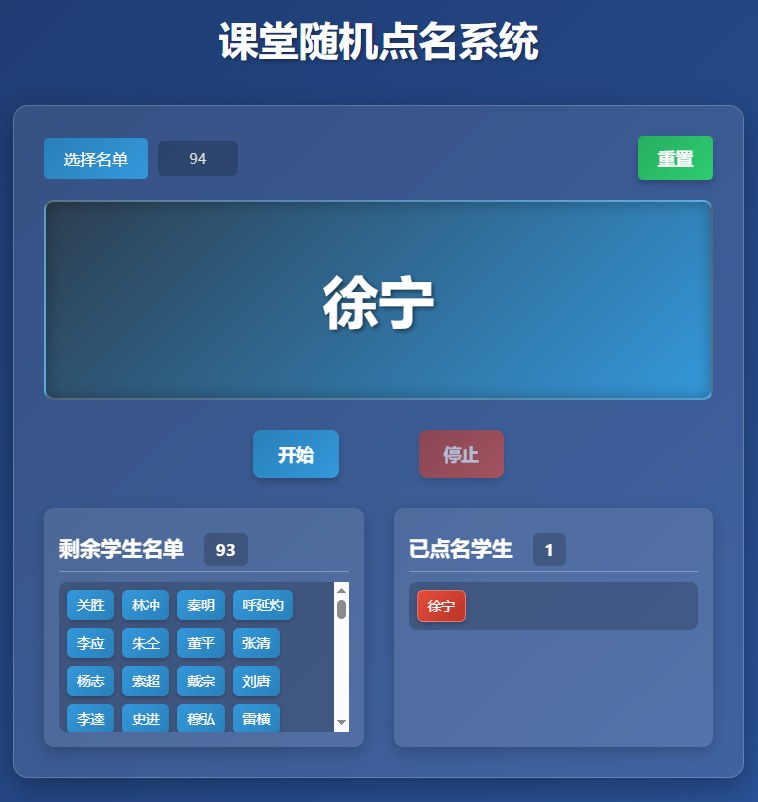
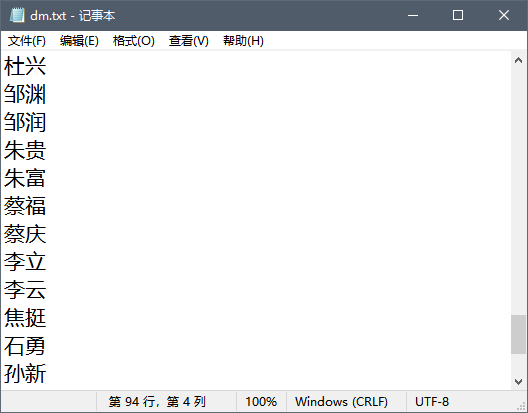
上课用的随机点名的html应用,可选择txt文本名单表,txt文件中的每个学生名字各占一行。
简洁的界面,包含随机显示区域和控制按钮;
实现从文本文件读取学生名单的功能;
添加随机点名逻辑,确保公平性;
记录已点名的学生,避免重复点名;
提供重置功能,以便重新开始;
可独立使用或嵌入wps演示文稿使用。
文末有下载链接,可创建多个txt格式班级名单文件,每个学生名字占一行
以下是实现代码( 由 deepseek 依据人工指令生成):
<!DOCTYPE html>
<html>
<head>
    <meta charset="UTF-8">
    <meta name="viewport" content="width=device-width, initial-scale=1.0">
    <title>课堂随机点名系统</title>
    <style>
        * {
            margin: 0;
            padding: 0;
            box-sizing: border-box;
            font-family: 'Microsoft YaHei', sans-serif;
        }

        body {
            background: linear-gradient(135deg, #1e3c72 0%, #2a5298 100%);
            color: #fff;
            min-height: 100vh;
            padding: 20px;
            display: flex;
            flex-direction: column;
            align-items: center;
        }

        .container {
            width: 100%;
            max-width: 900px;
            background-color: rgba(255, 255, 255, 0.1);
            border-radius: 15px;
            box-shadow: 0 10px 30px rgba(0, 0, 0, 0.3);
            padding: 30px;
            margin-top: 20px;
            backdrop-filter: blur(10px);
            border: 1px solid rgba(255, 255, 255, 0.2);
        }

        h1 {
            text-align: center;
            color: #fff;
            margin-bottom: 20px;
            font-size: 2.5rem;
            text-shadow: 2px 2px 4px rgba(0, 0, 0, 0.3);
        }

        .display-area {
            background: linear-gradient(135deg, #2c3e50 0%, #3498db 100%);
            height: 200px;
            border-radius: 10px;
            display: flex;
            justify-content: center;
            align-items: center;
            margin-bottom: 30px;
            box-shadow: inset 0 0 15px rgba(0, 0, 0, 0.3);
            position: relative;
            overflow: hidden;
            border: 2px solid rgba(255, 255, 255, 0.2);
        }

        .name-display {
            font-size: 3.5rem;
            font-weight: bold;
            color: #fff;
            text-align: center;
            transition: all 0.3s ease;
            text-shadow: 2px 2px 4px rgba(0, 0, 0, 0.5);
        }

        .controls {
            display: flex;
            justify-content: center;
            gap: 20px;
            margin-bottom: 30px;
        }

        button {
            padding: 12px 25px;
            font-size: 1.1rem;
            border: none;
            border-radius: 8px;
            cursor: pointer;
            transition: all 0.3s ease;
            font-weight: bold;
            box-shadow: 0 4px 6px rgba(0, 0, 0, 0.2);
        }

        #startBtn {
            background: linear-gradient(135deg, #2980b9 0%, #3498db 100%);
            color: white;
            margin-left:30px;
            margin-right:30px;
        }

        #stopBtn {
            background: linear-gradient(135deg, #c0392b 0%, #e74c3c 100%);
            color: white;
            margin-left:30px;
            margin-right:30px;
        }

        .top-buttons {
            display: flex;
            justify-content: space-between;
            align-items: center;
            margin-bottom: 20px;
        }

        .file-input {
            display: flex;
            align-items: center;
            gap: 10px;
        }

        .file-input label {
            display: inline-block;
            background: linear-gradient(135deg, #2980b9 0%, #3498db 100%);
            color: white;
            padding: 10px 20px;
            border-radius: 5px;
            cursor: pointer;
            transition: all 0.3s ease;
            white-space: nowrap;
        }

        .file-input label:hover {
            transform: translateY(-2px);
            box-shadow: 0 4px 8px rgba(0, 0, 0, 0.2);
        }

        .file-info {
            font-size: 0.9rem;
            color: #ddd;
            background: rgba(0, 0, 0, 0.2);
            padding: 8px 12px;
            border-radius: 6px;
            min-width: 80px;
            text-align: center;
        }

        .reset-btn {
            background: linear-gradient(135deg, #27ae60 0%, #2ecc71 100%);
            color: white;
            white-space: nowrap;
            display: inline-block;
            color: white;
            padding: 10px 20px;
            border-radius: 5px;
            cursor: pointer;
            transition: all 0.3s ease;
        }

        button:hover {
            transform: translateY(-3px);
            box-shadow: 0 6px 8px rgba(0, 0, 0, 0.3);
        }

        button:active {
            transform: translateY(1px);
        }

        button:disabled {
            opacity: 0.6;
            cursor: not-allowed;
            transform: none;
        }

        .student-list {
            display: flex;
            flex-wrap: wrap;
            gap: 8px;
            margin-top: 10px;
            max-height: 150px;
            min-height:40px;
            overflow-y: auto;
            padding: 8px;
            border-radius: 8px;
            background: rgba(0, 0, 0, 0.2);
        }

        .student-card {
            background: linear-gradient(135deg, #3498db 0%, #2980b9 100%);
            padding: 6px 10px;
            border-radius: 6px;
            box-shadow: 0 2px 4px rgba(0, 0, 0, 0.2);
            transition: all 0.3s ease;
            color: white;
            font-size: 0.85rem;
        }

        .student-card:hover {
            transform: translateY(-2px);
            box-shadow: 0 4px 6px rgba(0, 0, 0, 0.3);
        }

        .student-card.selected {
            background: linear-gradient(135deg, #e74c3c 0%, #c0392b 80%);
            border: 1px solid rgba(255, 255, 255, 0.3);
        }

        .lists-container {
            display: flex;
            gap: 30px;
            margin-top: 20px;
        }

        .list-section {
            flex: 1;
            background: rgba(255, 255, 255, 0.1);
            padding: 15px;
            border-radius: 10px;
            box-shadow: 0 5px 15px rgba(0, 0, 0, 0.2);
        }

        h2 {
            color: #fff;
            margin-bottom: 10px;
            padding-bottom: 5px;
            border-bottom: 1px solid rgba(255, 255, 255, 0.3);
            font-size: 1.3rem;
        }

        .counter {
            text-align: center;
            margin-top: 10px;
            margin-left:20px;
            font-size: 1rem;
            color: #fff;
            background: rgba(0, 0, 0, 0.2);
            padding: 6px 12px;
            border-radius: 6px;
            display: inline-block;
        }

        @media (max-width: 768px) {
            .lists-container {
                flex-direction: column;
            }

            .name-display {
                font-size: 2.5rem;
            }

            .controls {
                flex-direction: column;
                align-items: center;
            }

            button {
                width: 80%;
            }

            .student-list {
                max-height: 120px;
            }

            .top-buttons {
                flex-direction: column;
                gap: 15px;
            }

            .file-input {
                width: 100%;
                justify-content: center;
            }
        }
    </style>
</head>
<body>
    <h1>课堂随机点名系统</h1>

    <div>
        <div>
            <div>
                <label for="studentFile">选择名单</label>
                <div id="fileInfo">0</div>
                <input type="file" id="studentFile" accept=".txt" style="display: none;">
            </div>

            <button id="resetBtn">重置</button>
        </div>

        <div>
            <div id="nameDisplay">准备开始</div>
        </div>

        <div>
            <button id="startBtn">开始</button>
            <button id="stopBtn" disabled>停止</button>
        </div>

        <div>
            <div>
                <h2>剩余学生名单<span id="remainingCount">0</span></h2>
                <div id="remainingStudents"></div>
            </div>

            <div>
                <h2>已点名学生<span id="selectedCount">0</span></h2>
                <div id="selectedStudents"></div>
            </div>
        </div>
    </div>

    <script>
        document.addEventListener('DOMContentLoaded', function() {
            const nameDisplay = document.getElementById('nameDisplay');
            const startBtn = document.getElementById('startBtn');
            const stopBtn = document.getElementById('stopBtn');
            const resetBtn = document.getElementById('resetBtn');
            const studentFile = document.getElementById('studentFile');
            const fileInfo = document.getElementById('fileInfo');
            const remainingStudents = document.getElementById('remainingStudents');
            const selectedStudents = document.getElementById('selectedStudents');
            const remainingCount = document.getElementById('remainingCount');
            const selectedCount = document.getElementById('selectedCount');

            let allStudents = [];
            let remaining = [];
            let selected = [];
            let intervalId = null;
            let isRunning = false;

            // 文件选择事件
            studentFile.addEventListener('change', function(e) {
                const file = e.target.files[0];
                if (!file) return;

                const reader = new FileReader();
                reader.onload = function(e) {
                    const content = e.target.result;
                    allStudents = content.split('\n')
                        .map(name => name.trim())
                        .filter(name => name.length > 0);

                    if (allStudents.length === 0) {
                        alert('文件为空或格式不正确,请确保每行一个学生姓名');
                        return;
                    }

                    fileInfo.textContent = allStudents.length;
                    resetSelection();
                };

                reader.readAsText(file);
            });

            // 开始随机点名
            startBtn.addEventListener('click', function() {
                if (remaining.length === 0) {
                    alert('所有学生都已被点名!请重置后重新开始。');
                    return;
                }

                isRunning = true;
                startBtn.disabled = true;
                stopBtn.disabled = false;

                intervalId = setInterval(() => {
                    const randomIndex = Math.floor(Math.random() * remaining.length);
                    nameDisplay.textContent = remaining[randomIndex];
                }, 100);
            });

            // 停止随机点名
            stopBtn.addEventListener('click', function() {
                if (!isRunning) return;

                clearInterval(intervalId);
                isRunning = false;
                startBtn.disabled = false;
                stopBtn.disabled = true;

                // 获取当前显示的学生
                const currentStudent = nameDisplay.textContent;

                // 从剩余名单中移除
                const index = remaining.indexOf(currentStudent);
                if (index !== -1) {
                    remaining.splice(index, 1);
                    selected.push(currentStudent);

                    updateStudentLists();
                    updateCounters();
                }
            });

            // 重置点名
            resetBtn.addEventListener('click', function() {
                if (isRunning) {
                    clearInterval(intervalId);
                    isRunning = false;
                }

                startBtn.disabled = false;
                stopBtn.disabled = true;
                nameDisplay.textContent = '准备开始';

                resetSelection();
            });

            // 重置选择
            function resetSelection() {
                if (allStudents.length === 0) return;

                remaining = [...allStudents];
                selected = [];

                updateStudentLists();
                updateCounters();
            }

            // 更新学生列表显示
            function updateStudentLists() {
                // 更新剩余学生列表
                remainingStudents.innerHTML = '';
                remaining.forEach(student => {
                    const studentCard = document.createElement('div');
                    studentCard.className = 'student-card';
                    studentCard.textContent = student;
                    remainingStudents.appendChild(studentCard);
                });

                // 更新已点名学生列表
                selectedStudents.innerHTML = '';
                selected.forEach(student => {
                    const studentCard = document.createElement('div');
                    studentCard.className = 'student-card selected';
                    studentCard.textContent = student;
                    selectedStudents.appendChild(studentCard);
                });
            }

            // 更新计数器
            function updateCounters() {
                remainingCount.textContent = remaining.length;
                selectedCount.textContent = selected.length;
            }
        });
    </script>
</body>
</html>
 随机点名_deepseek.html (需创建txt格式的学生名单配合使用)

目录 返回
首页