网卡MAC采集器
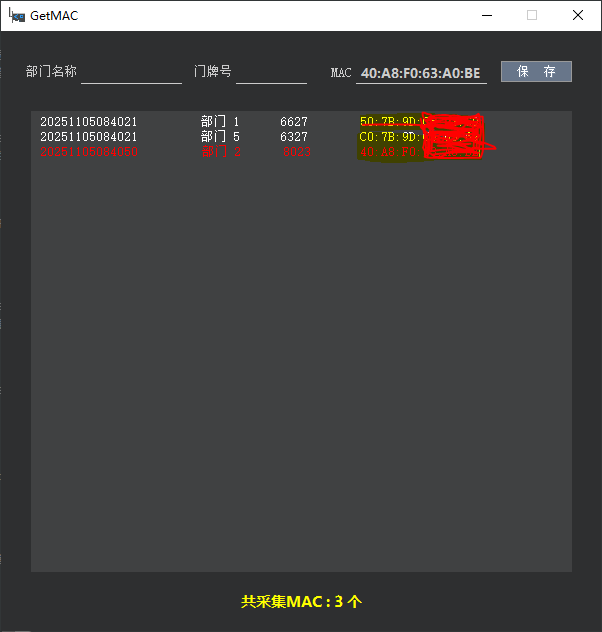
单位从2024年起对所有联网终端采取按门牌号和MAC管理,为快速准确采集联网的网卡MAC写的小程序;
输入部门名称和门牌号后直接保存即可,数据存储在同级目录下的txt文件中,当前mac红色显示;
开发环境:windows10 Qt5.15.2 C++
运行环境:x86 win7-11
mainwindow.h
#ifndef MAINWINDOW_H
#define MAINWINDOW_H

#include <QMainWindow>
#include <QtNetwork>

QT_BEGIN_NAMESPACE
namespace Ui {
class MainWindow;
}
QT_END_NAMESPACE

class MainWindow : public QMainWindow
{
    Q_OBJECT

public:
    MainWindow(QWidget *parent = nullptr);
    ~MainWindow();
    void getMac();
    void readTxtFile();
    void writeTxtFile();
    QString getDateTime();

private:
    Ui::MainWindow *ui;
};
#endif // MAINWINDOW_H
mainwindow.cpp
#include "mainwindow.h"
#include "ui_mainwindow.h"

//bool flag=true;

MainWindow::MainWindow(QWidget *parent)
    : QMainWindow(parent)
    , ui(new Ui::MainWindow)
{
    ui->setupUi(this);
    this->getMac();
    this->readTxtFile();
    connect(ui->pushButton,&QPushButton::clicked,this,&MainWindow::writeTxtFile);


}

MainWindow::~MainWindow()
{
    delete ui;
}

void MainWindow::getMac()
{
    QList<QNetworkInterface> nets = QNetworkInterface::allInterfaces();// 获取所有网络接口列表
    int nCnt = nets.count();
    QString currentMac = "";
    QString strMac = "";
    for(int i = 0; i < nCnt; i ++)
    {
        // 如果此网络接口被激活并且正在运行并且不是回环地址,则就是我们需要找的Mac地址
        if(nets[i].flags().testFlag(QNetworkInterface::IsUp) && nets[i].flags().testFlag(QNetworkInterface::IsRunning) && !nets[i].flags().testFlag(QNetworkInterface::IsLoopBack))
        {
            currentMac = nets[i].hardwareAddress();
            ui->macTxt->setText(currentMac);
            //ui->macBox->addItem(currentMac);
            break;
        }
    }

}


void MainWindow::readTxtFile()
{
    int macNum=0;
    QString str="";
    ui->textEdit->setText("");
    QString filePath = QDir::currentPath()+"/MacList.txt";;
    QStringList lines;
    QFile file(filePath);
    if (file.open(QIODevice::ReadOnly | QIODevice::Text))
    {
        QTextStream stream(&file);
        while (!stream.atEnd())
        {
            QString line = stream.readLine();
            lines.append(line);
            if(line.indexOf(ui->macTxt->text())>0){

                ui->pushButton->setEnabled(false);
                ui->textEdit->append("<font color='#FF0000'>"+line+"</font>");
                macNum = macNum+1;
                ui->pushButton->setCursor(Qt::PointingHandCursor);
            }
            else{
                ui->textEdit->append(line);
                ui->pushButton->setCursor(Qt::WaitCursor);
                macNum = macNum+1;


            }
        }
        str = QString::number(macNum);
        ui->msgLabel->setText("共采集MAC : "+ str +" 个");
        file.close();
    }
    else{
        ui->msgLabel->setText("MacList.txt 文件打开失败!");
    }
    //return lines;
}

void MainWindow::writeTxtFile()
{
    QString filePath = QDir::currentPath()+"/MacList.txt";
    QFile file(filePath);
    if(!file.open(QIODevice::ReadWrite | QIODevice::Append))   //以读写且追加的方式写入文本
    {
            ui->msgLabel->setText("MacList.txt 文件打开失败!");
    }

    QString department = ui->departmentTxt->text();
    QString doorNum = ui->doorNumTxt->text();
    if(department.length()>0 && doorNum.length()>0){
        QTextStream txtOutput(&file);
        QString str = this->getDateTime()+"\t"+department +"\t"+ doorNum +"\t"+ui->macTxt->text();
        txtOutput << str << endl;
    }
    file.close();


    this->readTxtFile();
}

QString MainWindow::getDateTime()
{
    QDateTime currentDateTime = QDateTime::currentDateTime();

    QString dtStr = currentDateTime.toString("yyyyMMddhhmmss");

    return dtStr;
}
mainwindow.ui
<?xml version="1.0" encoding="UTF-8"?> <ui version="4.0"> <class>MainWindow</class> <widget class="QMainWindow" name="MainWindow"> <property name="geometry"> <rect> <x>0</x> <y>0</y> <width>600</width> <height>600</height> </rect> </property> <property name="minimumSize"> <size> <width>600</width> <height>600</height> </size> </property> <property name="maximumSize"> <size> <width>600</width> <height>600</height> </size> </property> <property name="windowTitle"> <string>GetMAC</string> </property> <property name="windowIcon"> <iconset> <normaloff>ICO.ico</normaloff>ICO.ico</iconset> </property> <property name="styleSheet"> <string notr="true">background-color: rgb(46, 47, 48); border:none;</string> </property> <widget class="QWidget" name="centralwidget"> <widget class="QLabel" name="label"> <property name="geometry"> <rect> <x>15</x> <y>30</y> <width>61</width> <height>20</height> </rect> </property> <property name="font"> <font> <pointsize>10</pointsize> </font> </property> <property name="styleSheet"> <string notr="true">color: rgb(204, 204, 204);</string> </property> <property name="text"> <string>部门名称</string> </property> <property name="alignment"> <set>Qt::AlignmentFlag::AlignRight|Qt::AlignmentFlag::AlignTrailing|Qt::AlignmentFlag::AlignVCenter</set> </property> </widget> <widget class="QLineEdit" name="departmentTxt"> <property name="geometry"> <rect> <x>80</x> <y>30</y> <width>101</width> <height>23</height> </rect> </property> <property name="font"> <font> <family>Microsoft YaHei UI</family> <pointsize>10</pointsize> <italic>false</italic> <bold>true</bold> </font> </property> <property name="styleSheet"> <string notr="true">color: #CCCCCC; font: 700 10pt "Microsoft YaHei UI"; border:none; border-bottom:1px solid #CCCCCC; padding-left:3px;</string> </property> </widget> <widget class="QLabel" name="label_2"> <property name="geometry"> <rect> <x>190</x> <y>30</y> <width>41</width> <height>20</height> </rect> </property> <property name="font"> <font> <pointsize>10</pointsize> </font> </property> <property name="styleSheet"> <string notr="true">color: rgb(204, 204, 204);</string> </property> <property name="text"> <string>门牌号</string> </property> <property name="alignment"> <set>Qt::AlignmentFlag::AlignRight|Qt::AlignmentFlag::AlignTrailing|Qt::AlignmentFlag::AlignVCenter</set> </property> </widget> <widget class="QLineEdit" name="doorNumTxt"> <property name="geometry"> <rect> <x>235</x> <y>30</y> <width>71</width> <height>23</height> </rect> </property> <property name="font"> <font> <family>Microsoft YaHei UI</family> <pointsize>10</pointsize> <italic>false</italic> <bold>true</bold> </font> </property> <property name="styleSheet"> <string notr="true">color: #CCCCCC; font: 700 10pt "Microsoft YaHei UI"; border:none; border-bottom:1px solid #CCCCCC; padding-left:3px;</string> </property> </widget> <widget class="QLabel" name="label_3"> <property name="geometry"> <rect> <x>310</x> <y>31</y> <width>41</width> <height>20</height> </rect> </property> <property name="font"> <font> <pointsize>10</pointsize> </font> </property> <property name="styleSheet"> <string notr="true">color: rgb(204, 204, 204);</string> </property> <property name="text"> <string>MAC</string> </property> <property name="alignment"> <set>Qt::AlignmentFlag::AlignRight|Qt::AlignmentFlag::AlignTrailing|Qt::AlignmentFlag::AlignVCenter</set> </property> </widget> <widget class="QLineEdit" name="macTxt"> <property name="geometry"> <rect> <x>355</x> <y>30</y> <width>131</width> <height>23</height> </rect> </property> <property name="font"> <font> <family>Microsoft YaHei UI</family> <pointsize>10</pointsize> <italic>false</italic> <bold>true</bold> </font> </property> <property name="styleSheet"> <string notr="true">color: #CCCCCC; font: 700 10pt "Microsoft YaHei UI"; border:none; border-bottom:1px solid #CCCCCC; padding-left:3px;</string> </property> </widget> <widget class="QPushButton" name="pushButton"> <property name="geometry"> <rect> <x>500</x> <y>30</y> <width>71</width> <height>21</height> </rect> </property> <property name="font"> <font> <pointsize>10</pointsize> </font> </property> <property name="styleSheet"> <string notr="true">color: rgb(255, 255, 255); border:1px solid #999999; background-color: rgb(104, 118, 138);</string> </property> <property name="text"> <string>保 存</string> </property> </widget> <widget class="QLabel" name="msgLabel"> <property name="geometry"> <rect> <x>30</x> <y>559</y> <width>541</width> <height>23</height> </rect> </property> <property name="sizePolicy"> <sizepolicy hsizetype="Preferred" vsizetype="Preferred"> <horstretch>0</horstretch> <verstretch>0</verstretch> </sizepolicy> </property> <property name="font"> <font> <family>Microsoft YaHei UI</family> <pointsize>11</pointsize> <italic>false</italic> <bold>true</bold> </font> </property> <property name="styleSheet"> <string notr="true">color: rgb(255, 255,0); font: 700 11pt "Microsoft YaHei UI";</string> </property> <property name="text"> <string/> </property> <property name="alignment"> <set>Qt::AlignmentFlag::AlignCenter</set> </property> </widget> <widget class="QTextEdit" name="textEdit"> <property name="geometry"> <rect> <x>30</x> <y>80</y> <width>541</width> <height>461</height> </rect> </property> <property name="font"> <font> <pointsize>10</pointsize> </font> </property> <property name="styleSheet"> <string notr="true">background-color: rgb(64, 65, 66); color: rgb(255, 255, 255); padding-left:5px;</string> </property> </widget> </widget> </widget> <resources/> <connections/> </ui>
目录 返回
首页